




Got an old smartphone sitting in a drawer somewhere? Before you let it collect another year of dust, there’s a surprisingly useful way to put it back to work.
That old phone in your drawer can still come in handy. With the Buddy Dog Monitor app, you can leave it at home with your dog and use your regular phone to check in while you’re at work, out running errands, or away for the weekend.
No extra camera hardware or complicated setup is needed—just two compatible devices and the app.
Here’s how to set it up with the Buddy Dog Monitor app.
What You Need to Turn an Old Phone Into a Pet Camera
The setup is simpler than you might expect.
To use an old phone as a pet camera, you’ll need:
- An old smartphone or tablet to stay with your dog
- A second compatible smartphone or tablet to use as the viewer
- The Buddy Dog Monitor app installed on both devices
- An internet connection
- A safe place to position the pet device
- A power source if you’ll be away for several hours
That’s really it.
You don’t need a separate pet camera or any extra equipment. The phone you already have can do the job.
That makes an old smartphone a handy option, especially if you recently upgraded and still have your previous phone at home. It doesn’t have to be the latest model—it just needs to be compatible with the Buddy Dog Monitor app and have a working camera, microphone, and internet connection.
Step 1: Install the Buddy Dog Monitor App on Both Devices
Start by installing the Buddy Dog Monitor app on the old phone and the device you’ll carry with you. Think of the two devices as having different jobs:
- The old phone is the pet unit. It stays at home with your dog and uses its camera and microphone.
- Your everyday phone is the owner unit. You take it with you so you can check in remotely.
This setup also works with compatible tablets, so you don’t necessarily need two smartphones.
After you install the app, open it on both devices.
Step 2: Pair the Two Devices
Next, connect the devices so they can communicate.
With the Buddy Dog Monitor app, you can pair the two devices using a QR code or a numeric code. Follow the pairing instructions shown in the app and make sure both devices are online.
Once they’re paired, the old phone becomes your remote pet camera.
It’s a good idea to complete the setup while you’re still at home. That way, you can test everything before you actually need it.
A Quick Setup Check
Before you leave:
- Open the live video feed.
- Check that your dog is clearly visible.
- Listen to make sure the audio is working.
- Test the connection
- Make sure the pet device has enough power.
A two-minute test now can save you from discovering a problem after you’ve already left.
Step 3: Find the Right Spot for the Old Phone
Where you place the phone makes a big difference.
Pick a spot where you can see most of the room, but keep the device somewhere your dog can’t knock it over, chew on it, or get tangled up in the charging cable.
A stable shelf, table, or other secure surface can work well. Position the camera so your dog has enough room to move around within the frame.
With the Buddy Dog Monitor app, the pet device doesn’t need to be right next to your dog. About 2 meters (7 feet) can work well for picking up audio while keeping the phone safely out of reach.
Think about your dog’s normal routine, too.
If your dog spends most of the day on the couch, don’t point the camera at an empty corner of the room. If they move between several areas, choose a wider viewpoint that captures as much of their usual space as possible.
Step 4: Keep the Pet Device Connected to Power
This is one of the easiest things to overlook.
A smartphone can work perfectly as a smartphone pet camera, but running the camera, microphone, and internet connection uses battery power.
If you’re away for a few hours, plug the pet device into a reliable power source.
Ideally, place the phone somewhere secure enough that your dog can’t pull on the charging cable or reach the outlet.
For longer monitoring sessions, keeping the device connected to power means you won’t have to worry about the phone shutting down mid-day.

Step 5: Make Sure the Internet Connection Is Reliable
Your old phone needs an internet connection to send the video and audio to the device you’re using to monitor your dog.
A home Wi-Fi connection is usually the simplest option.
The key is keeping the pet device connected. If the Wi-Fi signal is weak in the room where your dog spends time, try moving the phone closer to your router or choosing another suitable location.
Your viewing device can be somewhere completely different. That’s the whole point.
You can leave the old phone at home while you monitor your dog from work, the store, or another city.
Step 6: Start Monitoring
Once everything is set up, you’re ready to go.
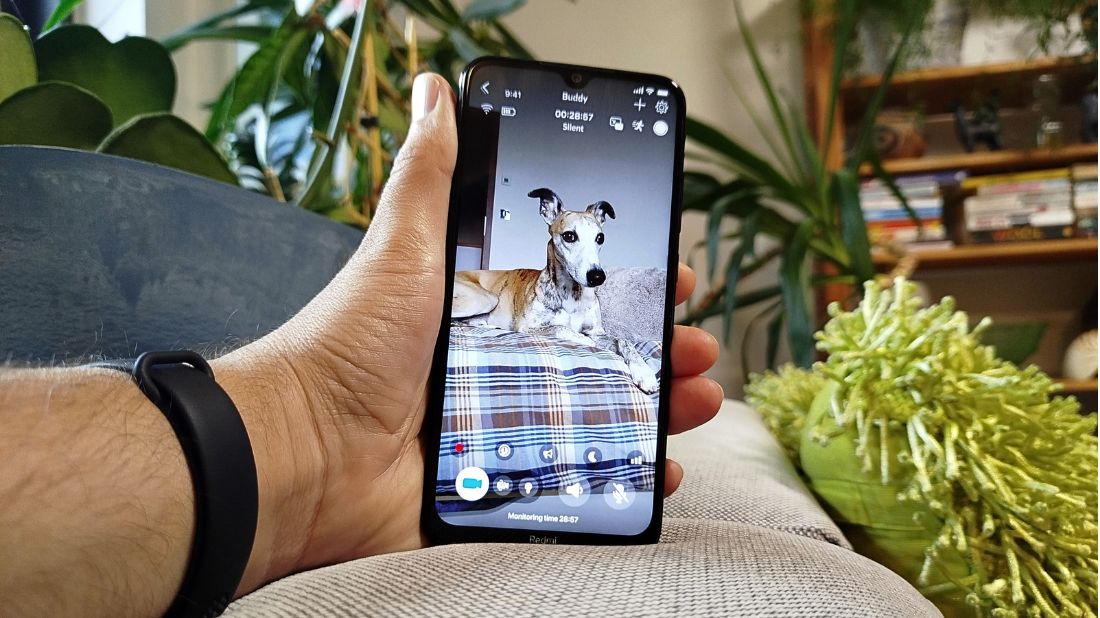
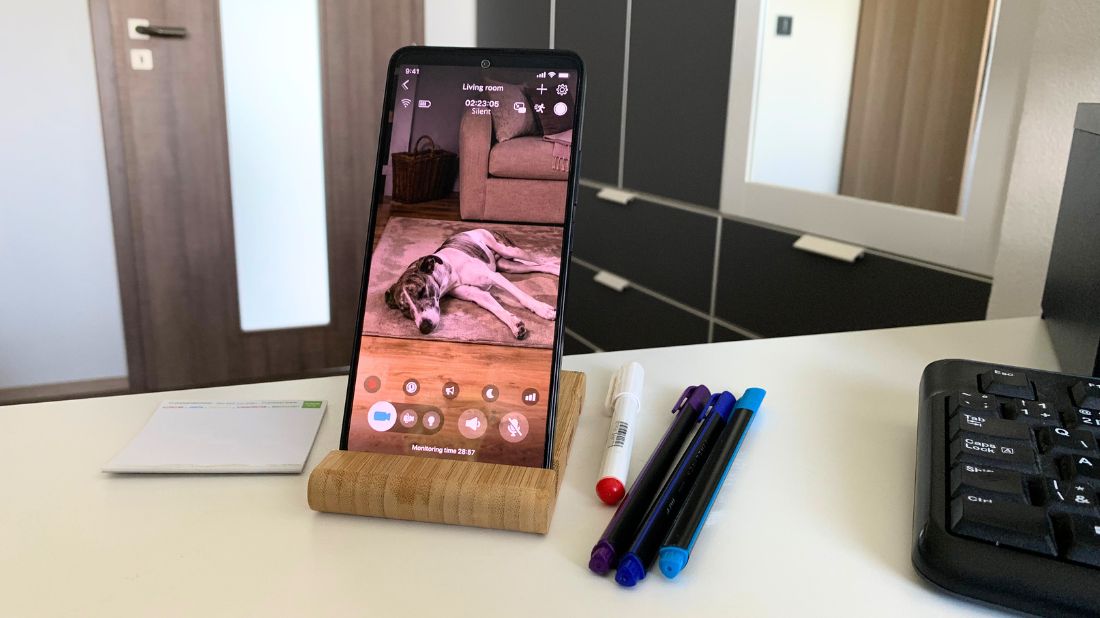
Leave the old phone with your dog, take your viewing device, and open the Buddy Dog Monitor app when you want to check in.
You can watch live video and listen to what’s happening at home. Depending on the situation, two-way audio lets you talk to your dog, while motion and noise detection can alert you when something is happening.
You don’t need to keep the screen open all day.
Maybe you check in during lunch. Maybe you get a noise alert and want to see what’s going on. Or perhaps you want to make sure your dog has settled down after you left.
That’s where turning an old phone into a pet camera becomes genuinely useful.
💡 Did you know?
You don’t necessarily need the latest smartphone for basic pet monitoring. A spare phone that can run the app, connect to the internet, and provide working camera and microphone functions may already be enough to build your setup.
Common Mistakes to Avoid
Using an old phone as a pet camera is easy, but a few small mistakes can make the experience less useful.
Putting the phone too close to your dog 👁️
Your dog may bump into it, knock it over, or decide it’s an interesting new chew toy. Keep the device safely out of reach, and make sure your dog can still see it.
Forgetting about the battery 🪫
An old phone with a weak battery may not last long during continuous monitoring. Plug it in when appropriate and make sure the charging setup is safe.
Choosing the wrong camera angle 📐
A perfect view of the floor isn’t very helpful if your dog spends most of the day on the couch. Watch your dog’s usual routine and position the phone accordingly.
Skipping the test 📄
Don’t assume everything works just because both devices are connected. Test the video, audio, alerts, and connection before leaving home.
Why Use an Old Phone Instead of Buying a Pet Camera?
The biggest advantage is simple: you may already have everything you need.
A dedicated pet camera means buying another device and finding a permanent place for it. An old smartphone offers a flexible alternative you can move around your home as needed.
It’s also useful when you aren’t sure how much you’ll actually use pet monitoring. You can try an app-based setup with a device you already own and see whether it fits your routine.
With the Buddy Dog Monitor app, your old phone can become the pet unit while your regular phone or tablet becomes the viewer.
Want to Try It First?
Not sure whether a pet monitoring app is right for you? You can try the Buddy Dog Monitor app with a free 3-day trial and explore all of its features before deciding whether it fits your routine.
After the trial, you can choose from weekly, monthly, or yearly plans, depending on how you prefer to use the app.
It gives you a chance to set everything up, leave your old phone with your dog, and see how remote monitoring works in your everyday life before committing to a longer plan.
Final Thoughts
Setting up an old phone as a pet camera is easier than you might think.
Install the Buddy Dog Monitor app on both devices, pair them, place the old phone somewhere safe with a good view of your dog, and make sure it’s connected to power and the internet.
Once everything is ready, you can check in on your dog anytime.
And that old phone sitting in a drawer? It might still have a pretty useful second life.
FAQs
Can I use any old phone as a pet camera?
You can use a compatible old smartphone or tablet with the Buddy Dog Monitor app as the pet unit. The device must be able to run the app and provide a working camera, microphone, and internet connectivity.
Do I need Wi-Fi to use an old phone as a pet camera?
The pet device needs an internet connection to communicate with your viewing device. The Buddy Dog Monitor app can work over Wi-Fi or mobile data, depending on the device and your setup.
Can I use my old iPhone as a dog camera?
Absolutely. A compatible old iPhone can work as the pet unit with the Buddy Dog Monitor app. Just install the app on your old iPhone and a second compatible device, pair the two, and place the iPhone somewhere safe where your dog spends most of their time.
Does the old phone need to stay plugged in?
It doesn’t have to stay plugged in for a short monitoring session, but plugging it into a safe power source is a good idea for longer periods. Continuous video and audio use more battery than normal phone use.
Can I talk to my dog through the old phone?
Yes. The Buddy Dog Monitor app includes two-way audio, so you can listen to your dog and speak to them remotely from your viewing device.
 Scroll Up